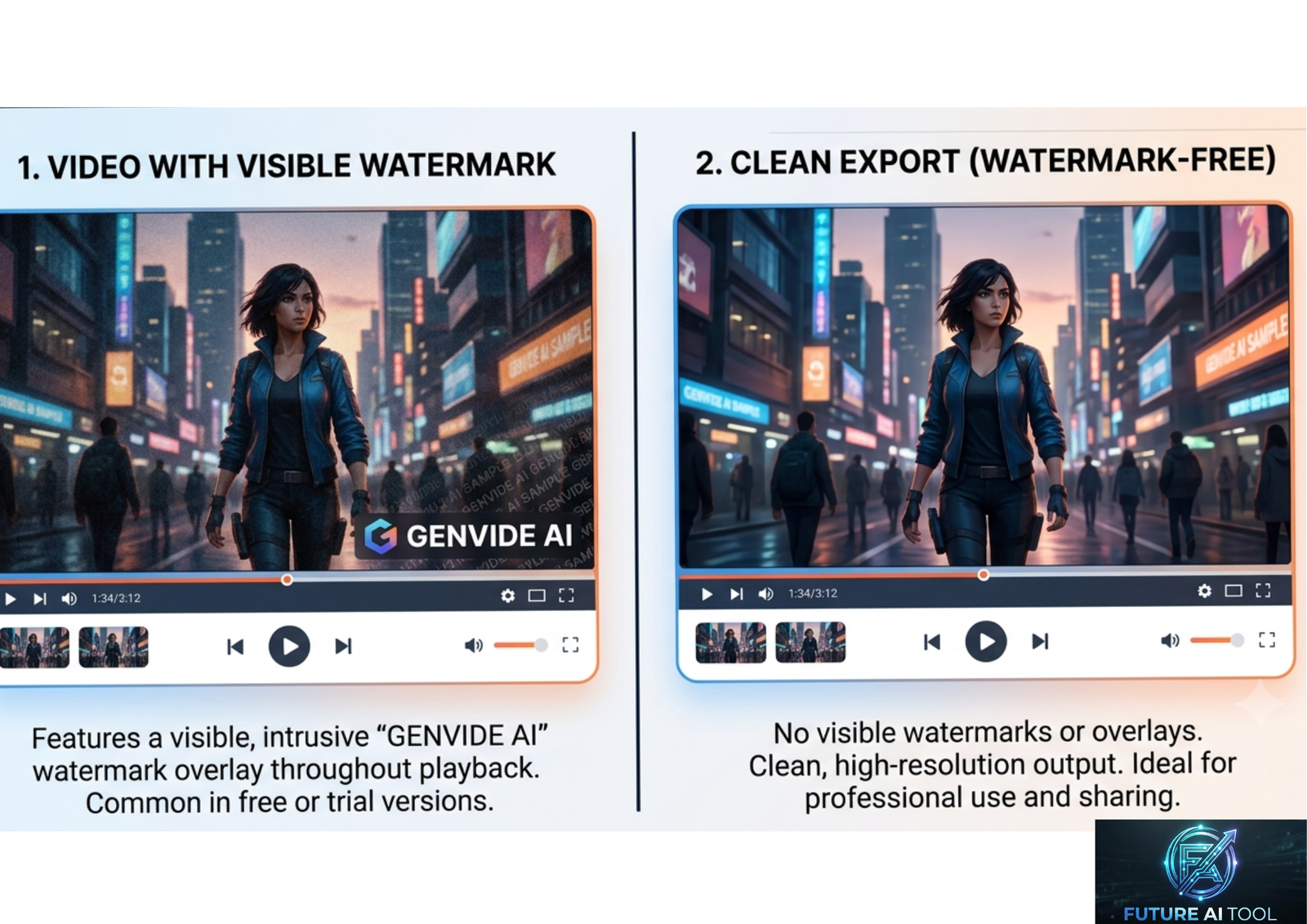
Why Watermarks Are Such a Big Deal
If you’ve ever generated a great AI video clip, only to find a logo stamped in the corner, you know the frustration. It’s not just an eyesore — it can make the video unusable.
A watermark on a video signals “free tier” the moment someone sees it. For a business, that’s a problem. You can’t put a branded logo from another company on your product ad, your social post, or your client’s marketing video. For a creator building a YouTube channel or a portfolio, it looks unfinished.
That’s why so many people search specifically for AI video generators without watermark, instead of just “AI video generator.” The distinction matters. A tool can generate a stunning clip and still be useless for real publishing if you can’t export it clean.
The good news: the landscape has changed a lot. Watermark-free output used to require a paid plan almost everywhere. Now, several tools offer genuinely clean exports even on free tiers — though the details vary a lot from platform to platform.
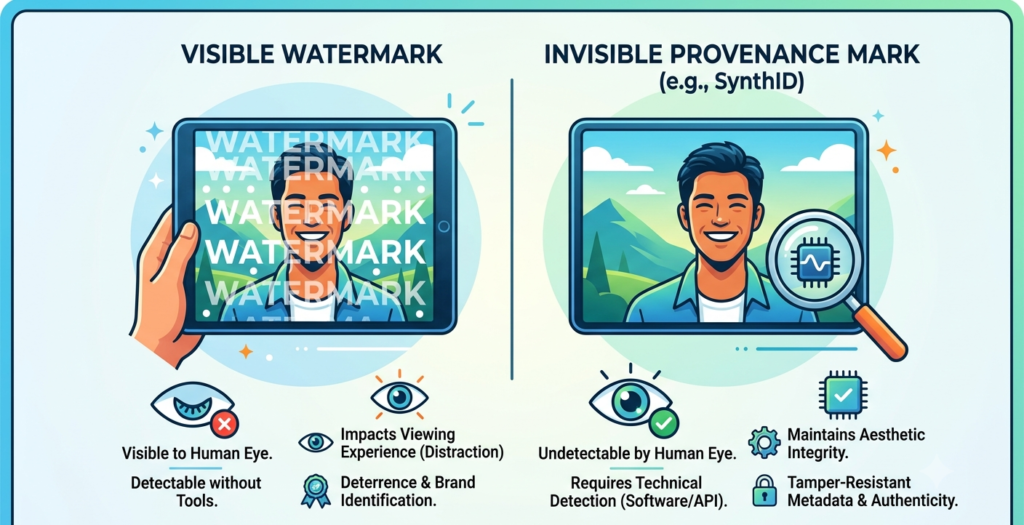
Visible Watermarks vs. Invisible Provenance Marks
Before comparing tools, it helps to understand that “no watermark” can mean two different things.
Visible watermarks are logos or text stamped directly on the video, usually in a corner. These are the ones that actually block usage — they’re what most people mean when they say “no watermark.”
Invisible provenance marks are a different thing entirely. Tools like Google’s SynthID embed an imperceptible signal into the video’s structure to indicate it was AI-generated. This kind of mark survives compression and re-encoding, but it’s not visible to your audience and doesn’t affect how the video looks or plays.
Some platforms also attach basic metadata (sometimes called C2PA data) noting that a file is AI-generated. This is invisible during playback and is typically stripped if the file is re-exported or re-encoded.
The practical takeaway: when this article says “no watermark,” it means no visible logo blocking your usage. Nearly every major model — even the ones with clean visible exports — may still carry some form of invisible provenance marking behind the scenes. That’s normal, and it doesn’t affect the video’s usability for social media, marketing, or client work.
What to Look For in a No-Watermark AI Video Tool
Before picking a tool, it’s worth checking a few things beyond just “does it have a watermark.”
- Free-tier limits. Watermark-free is only useful if the credits, resolution, or clip length are usable. Some tools are watermark-free but cap you at a few seconds of footage.
- Resolution. A clean export at 480p or 720p might not be good enough for professional use. Check whether 1080p is included or requires an upgrade.
- Commercial usage rights. A clean export and a commercial license are two separate questions. Some free tiers explicitly exclude commercial use, even without a visible watermark.
- Clip length. Many free tools cap generations at 5–10 seconds. If you need longer scenes, check the paid tiers or plan to stitch multiple clips together.
- Native audio. Several 2026-era models generate synchronized sound — dialogue, ambient noise, effects — in the same pass as the video, which saves a separate editing step.
- Model variety. Some platforms give you access to just one video model, while others let you switch between several depending on the shot you need.
Best AI Video Generators Without Watermark
Here’s a practical rundown of the tools most commonly recommended for clean, watermark-free output, based on how their free and paid tiers currently work.
1. Kling AI (Kling 3.0)
Kling has built a reputation for generous free usage and decent clip length. Its free tier commonly includes a solid daily credit allowance with watermark-free downloads at 720p, and paid plans unlock 1080p and considerably longer clips — reportedly up to a few minutes on professional tiers.
Best for: High-volume short-form content and creators who want a workable free tier before committing to a subscription.
2. Seedance (Seedance 2.0)
Seedance has quickly become one of the most cited options for watermark-free free-tier exports. It supports both text-to-video and image-to-video generation, and multiple independent comparisons rank it near the top for prompt adherence and motion quality.
Best for: Quick social clips and short animated content, especially when a clean export matters more than long clip duration.
3. Google Veo (Veo 3 / Veo 3.1)
Veo is widely regarded as a quality benchmark for realism, physics, and coherent motion. It’s accessible through Google AI Studio and Google’s consumer AI plans, and higher-tier Google AI plans explicitly include watermark-free export along with a larger credit allowance. A standout feature is native audio generation — ambient sound and effects generated in the same pass as the video.
Best for: Creators who prioritize visual realism and built-in audio over raw output volume.
4. Luma Dream Machine
Luma has one of the more generous free tiers for watermark-free video, offering a set number of monthly generations without a logo on standard-quality output. It handles both text prompts and reference images, with a keyframe system for controlling the start and end of a shot.
Best for: Photorealistic motion and creators who want start/end frame control without paying immediately.
5. Runway (Gen-4 / Gen-4.5)
Runway is one of the longest-standing names in AI video and remains a favorite for filmmakers due to its surrounding editing toolkit — inpainting, motion brush, and camera controls. Its free tier includes a batch of one-time credits, but exports carry a watermark; removing it requires stepping up to a paid plan.
Best for: Filmmakers and professionals who need post-generation editing tools, not just raw generation.
6. Pika
Pika is known for creative, stylized effects — melting, crushing, or transforming objects in a clip — which makes it popular for social content and meme-style videos. Free-tier watermark policies have shifted over time on this platform, so it’s worth checking current terms before relying on it for a client deliverable.
Best for: Playful, effects-driven short clips rather than realistic footage.
7. Hailuo (MiniMax Video)
Hailuo stands out for natural human motion — walking, gesturing, and facial expressions that look notably fluid compared to many competitors. It also offers a “subject reference” feature that keeps a specific person’s appearance consistent across a generated video.
Best for: Content involving realistic human movement or a consistent character across clips.
8. HeyGen
HeyGen focuses on AI avatars rather than raw generative scenes — ideal for training videos, explainer content, or presenter-led videos with voice cloning and multi-language support. Its free plan typically includes a watermark, with paid Creator-tier plans removing it and adding commercial rights.
Best for: Presenter-style videos, corporate training, and multilingual content.
9. CapCut (Desktop App)
CapCut isn’t a generative AI model in the same sense as the others — it’s primarily an editing tool — but its desktop app is frequently cited as one of the few options that exports edited videos completely free, without a watermark. It works well as the “assembly layer” for clips generated elsewhere.
Best for: Editing, captioning, and finishing videos generated by other tools.
10. Open-Source Models (Wan 2.2 / Wan 2.6)
For technical users with capable hardware, running open-source models like Wan locally is the only genuinely unlimited, watermark-free path. There’s no subscription, no credit system, and no logo — but it requires a capable GPU (often an NVIDIA RTX 40-series or newer) and comfort with managing model weights and dependencies.
Best for: Developers, technical creators, or teams generating video at scale who want to avoid recurring costs entirely.
Comparison Table
| Tool | Free Tier Watermark-Free? | Typical Free Limits | Best Use Case | Paid Plan Focus |
|---|---|---|---|---|
| Kling AI | Yes (at 720p) | Daily credit allowance | High-volume short clips | 1080p, longer clips |
| Seedance 2.0 | Yes | Short clip length (a few seconds) | Quick social/animated clips | Longer duration, higher res |
| Google Veo 3/3.1 | Yes (varies by plan) | Daily/monthly credit caps | Realistic footage with audio | Higher credit volume, no watermark guaranteed |
| Luma Dream Machine | Yes | ~30 generations/month | Photorealistic motion | More generations, faster renders |
| Runway Gen-4 | No (watermarked free) | One-time credit batch | Filmmaking with editing tools | Watermark removal, pro editing tools |
| Pika | Varies — verify current terms | Monthly credit allowance | Stylized effects clips | Higher resolution, more credits |
| Hailuo (MiniMax) | Yes (720p) | Generous free credits | Natural human motion | Higher resolution, consistency features |
| HeyGen | No (watermarked free) | Limited monthly videos | Avatar/presenter videos | Watermark removal, commercial rights |
| CapCut (desktop) | Yes | Full editing features | Editing and assembly | Cloud storage, premium assets |
| Wan (open-source, local) | Yes | Unlimited (hardware-dependent) | Technical/high-volume users | N/A — free forever, hardware cost only |
Free-tier terms change frequently across all platforms. Always confirm current limits and watermark policy directly on the provider’s site before relying on it for real work.
Free vs. Paid: Which Route Actually Makes Sense
If you’re an occasional creator making a handful of clips a month, the free tiers of Kling, Seedance, Luma, or Veo are usually enough — several of them genuinely export clean, watermark-free footage at a usable resolution.
If you’re producing content regularly — weekly social posts, client work, or a YouTube channel — the free-tier credit limits will likely become a bottleneck fast. In that case, a mid-tier paid plan (commonly in the $12–25/month range across most of these platforms) tends to remove the restrictions that matter most: resolution caps, clip length, and generation limits.
If you’re generating video at real scale — for a business, an agency, or a large content operation — running an open-source model locally can make more financial sense over time, despite the upfront hardware cost and technical setup.
Pros and Cons of Watermark-Free AI Video Tools
Pros
- Clean output that’s actually usable for social media, ads, and client work
- Many tools now offer decent watermark-free quality even on free tiers
- Native audio generation is increasingly built in, saving a separate editing step
- A wide range of styles available — realistic, stylized, avatar-based, and more
- Open-source local options exist for unlimited generation without recurring fees
Cons
- “Free and unlimited” watermark-free video does not really exist — free tiers are always credit- or time-limited
- Free-tier resolution and clip length are often restricted compared to paid plans
- Watermark policies change frequently, so what’s true today may not hold in a few months
- Commercial usage rights are a separate question from watermark status, and easy to overlook
- Local, open-source generation requires real technical setup and a capable GPU
How to Verify a Tool Is Actually Watermark-Free
Marketing pages don’t always match reality. Before you commit to a workflow, it’s worth doing a quick check yourself:
- Generate a short test clip on the free tier.
- Download the export and watch it at full size, not just a preview thumbnail.
- Check the corners and edges frame by frame, since some watermarks are semi-transparent and easy to miss on a quick glance.
- Read the platform’s current terms, since limits and watermark policy can shift between updates.
- Confirm resolution and length limits match what you actually need before building a full workflow around the tool.
Commercial Use: What You Need to Check First
A watermark-free export doesn’t automatically mean you can use the video commercially. These are two separate questions, and mixing them up is a common mistake.
- Check the platform’s commercial use terms specifically, not just the watermark policy.
- Look at what the model was trained on. Tools trained on licensed or public-domain data are generally considered safer for commercial use than ones trained on broad, unfiltered web data.
- Be cautious with outputs that closely resemble existing footage or stock imagery, since this can create copyright risk even without a visible watermark.
- When in doubt, use paid tiers for client or monetized work, since these typically come with clearer commercial licensing language than free tiers.
Frequently Asked Questions
1. What is the best AI video generator without a watermark?
There isn’t a single universal answer — it depends on your priorities. Kling and Seedance are strong picks for free, watermark-free exports, while Veo leads on visual realism and native audio.
2. Are there any AI video generators that are completely free and watermark-free with no limits?
No. Cloud-based video generation uses heavy computing resources, so genuinely unlimited free access doesn’t exist on any legitimate platform. Free tiers are always capped by credits, resolution, or clip length. Running an open-source model locally is the closest thing to unlimited, but it requires your own hardware.
3. Does Runway remove watermarks on the free plan?
No. Runway’s free tier includes a batch of one-time credits, but exports carry a watermark. Removing it requires upgrading to a paid plan.
4. Is Google Veo watermark-free?
Higher-tier Google AI plans include watermark-free export. Like most major models, Veo may still carry an invisible provenance mark (such as SynthID), which doesn’t affect visible video quality or usability.
5. Can I use free AI-generated videos for business or commercial purposes?
It depends entirely on the platform’s terms. A clean, watermark-free export doesn’t guarantee commercial rights — some free tiers explicitly exclude commercial use. Always check the specific license before publishing business content.
6. What’s the difference between a visible watermark and an invisible one?
A visible watermark is a logo or text stamped on the video that you can see. An invisible provenance mark, like SynthID, is embedded in the file’s structure to indicate AI origin, but it doesn’t show up during playback and doesn’t affect usability.
7. Which AI video tool is best for avatars and presenter-style videos?
HeyGen is generally the top choice for lifelike avatars, voice cloning, and multilingual presenter content, though its free tier typically includes a watermark.
8. Is CapCut good for removing watermarks from AI-generated clips?
CapCut isn’t a video generator itself, but its desktop app is a strong free option for editing and exporting clips without its own watermark — useful for polishing footage generated elsewhere.
9. Do open-source models like Wan really have no watermark at all?
Yes, when run locally, open-source models like Wan produce output with no branding or watermark, since you control the entire generation process. The trade-off is the need for capable hardware and technical setup.
10. How often do watermark and free-tier policies change?
Fairly often. AI video platforms update pricing, credit limits, and watermark policies regularly as the technology and competition evolve. Always verify current terms directly on the provider’s site before relying on a tool for ongoing work.
Conclusion
Watermark-free AI video is no longer a rare, paid-only feature. In 2026, several tools — including Kling, Seedance, Luma, and Google Veo — offer genuinely clean exports even on free tiers, a real shift from just a year or two ago.
That said, “free and watermark-free” almost always comes with some trade-off: limited credits, capped resolution, or shorter clip lengths. The right tool depends on what you’re actually producing.
Our recommendation: If you’re testing the waters or making occasional social content, start with Kling or Seedance for reliable free, watermark-free output. If visual realism and built-in audio matter most, try Google Veo. If you’re producing content regularly for a business or client, budget for a mid-tier paid plan — the resolution, clip length, and commercial rights it unlocks are usually worth the cost. And if you’re technical and generating video at real scale, running an open-source model locally is worth the setup for the long-term savings.